YouTube-Trending-Data-Analytics-on-AWS
📺 YouTube Trending Data Analytics on AWS
🧠 Overview
This project focuses on ingesting, transforming, and analyzing structured (CSV) and semi-structured (JSON) YouTube trending video data across multiple regions. The primary goal is to automate a cloud-based ETL pipeline using AWS services for scalable data engineering and business insights.
🎯 Project Goals
- 🔁 Data Ingestion: Automate ingestion of CSV and JSON data from local to S3 using AWS CLI.
- ⚙️ ETL System: Transform raw statistics and reference metadata using AWS Glue and Lambda.
- 💧 Data Lake: Store raw and cleansed data in an organized, queryable format in Amazon S3.
- 📈 Scalability: Design for scale using serverless architecture to accommodate dynamic data loads.
- ☁️ Cloud-Native Design: Use AWS-native services for seamless integration, scalability, and management.
- 📊 Reporting: Enable business intelligence via AWS Athena and QuickSight dashboards.
🧰 AWS Services Used
| Service | Purpose |
|---|---|
| Amazon S3 | Data lake to store raw, cleansed, and analytics data |
| AWS IAM | Access and role management for secure and granular service permissions |
| AWS CLI | Upload data to S3 with Hive-style partitioning (by region) |
| AWS Glue | Serverless ETL: Crawlers, Jobs, and Studio used for transformation |
| AWS Lambda | On-the-fly JSON transformation triggered by S3 events |
| AWS Athena | Serverless querying of both raw and enriched datasets |
| Amazon QuickSight | Visualization and dashboarding on final analytics data |
📦 Dataset Used
- Source: Kaggle - Trending YouTube Video Statistics
- Description: Includes daily trending YouTube videos per country, with CSVs for statistics and JSONs for category metadata.
- Fields:
video_id,title,views,likes,dislikes,comments,tags,publish_time,category_id,region, etc.
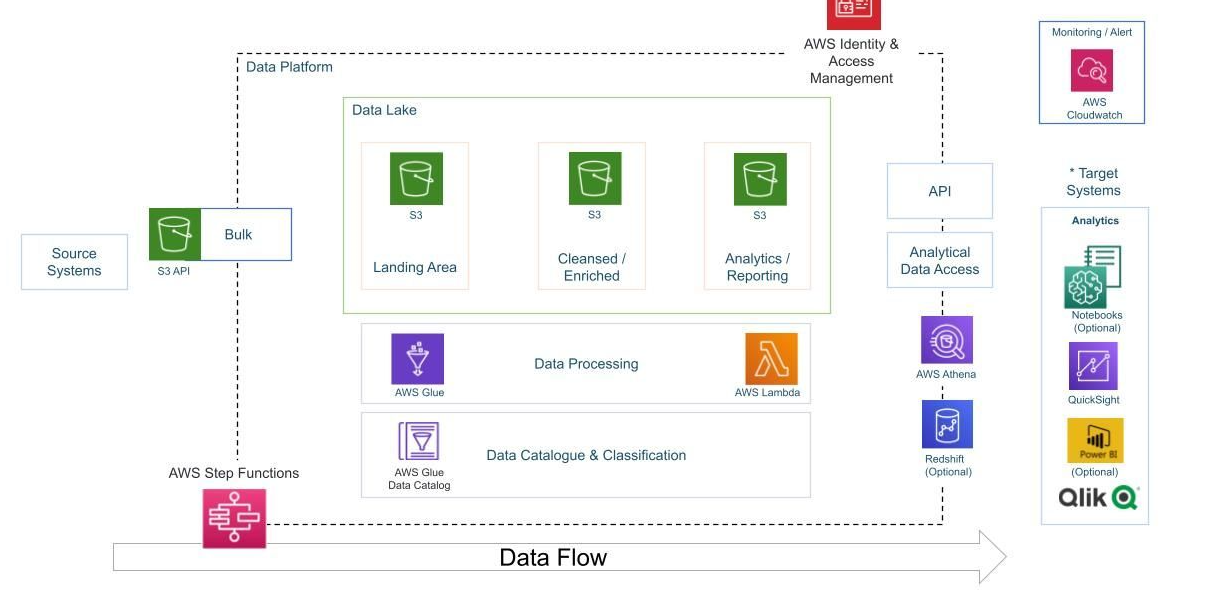
🏗️ Architecture Overview
Kaggle Data → S3 (Landing Bucket)
        → AWS Glue Crawlers → Glue Catalog Tables
        → AWS Lambda (Trigger on JSON) → S3 (Cleansed Bucket)
        → AWS Glue Jobs (ETL for CSV) → S3 (Cleansed Bucket)
        → AWS Glue Studio (Join JSON + CSV) → S3 (Analytics Bucket)
        → Athena + QuickSight Dashboards
 —
—
🔄 Detailed Project Flow
- Ingest Raw Data to S3
- Upload CSVs to:
s3://<bucket-name>/youtube/raw_statistics/region=XX/ - Upload JSONs to:
s3://<bucket-name>/youtube/raw_statistics_reference_data/
- Upload CSVs to:
- Catalog Raw Data
- Use AWS Glue Crawlers to scan the raw CSV and JSON directories and register them in the Glue Data Catalog.
- Preprocess JSON via Lambda
- Lambda function is triggered by S3 PUT events for JSON files.
- It extracts nested
itemsand writes to S3 in Parquet format.
- ETL on CSV via Glue Job (PySpark)
- Filter using
predicate_pushdownfor regions. - Apply schema mapping, clean nulls, and partition output by
region.
- Filter using
- Catalog Cleansed Data
- Crawl the cleaned S3 data to update the Glue Catalog.
- Athena Queries for Analysis
- Join
raw_statisticswithcleaned_statistics_reference_dataoncategory_id = id.
- Join
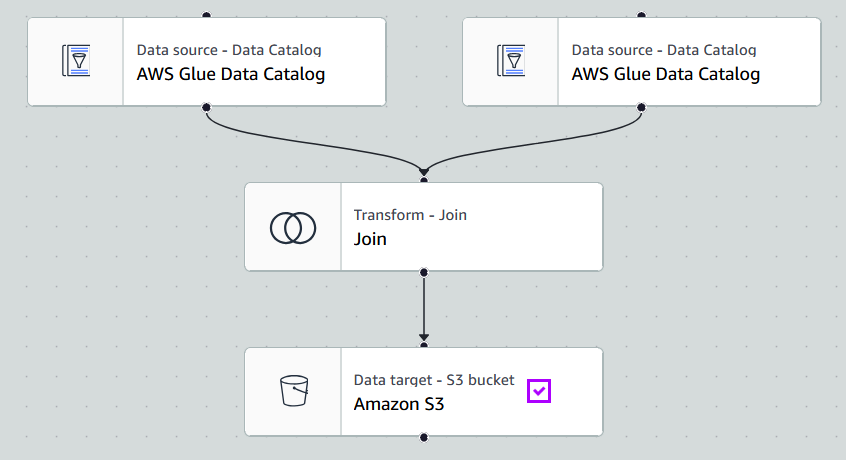
- Build ETL Join in Glue Studio
- Use
Inner Joinnode to merge CSV and JSON sources. - Output partitioned analytics data to
s3://<analytics-bucket>/.
- Use
- Visualize with QuickSight
- Connect to Athena → analytics table.
- Create region-wise and category-wise trend dashboards.
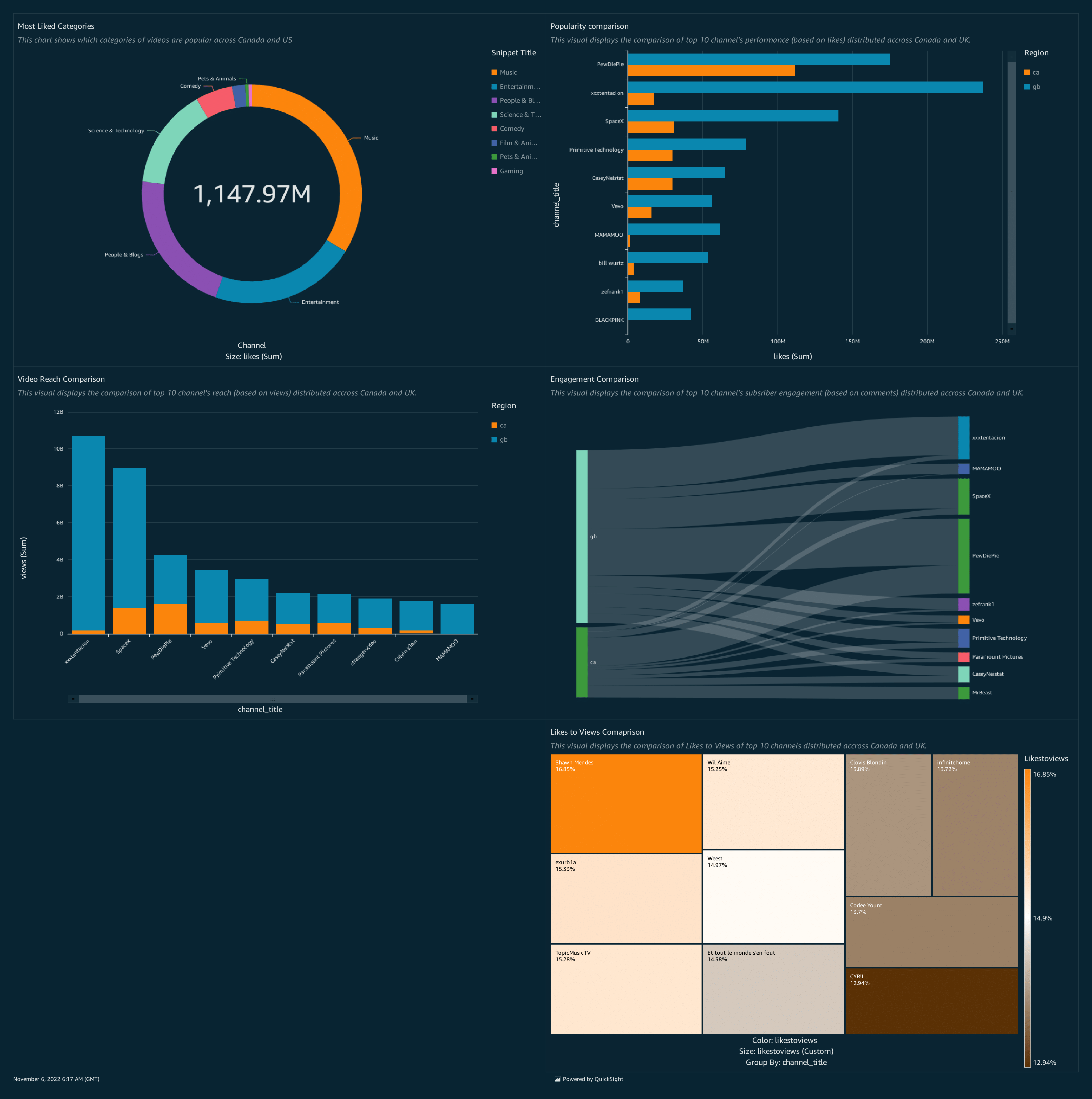
📊 Visual Output
Use Amazon QuickSight to create dashboard with some basic visualizations:
- Most liked categories
- Engagement comparison
- Popularity comparison
- Likes to views
- Video reach comparison
🙏 Acknowledgement
This project is inspired by the work of Darshil Parmar